1. Introduction
This blog covers a common issue where the Intelligent Hub catalog fails to load on Windows devices, often due to incorrect Organization Group (OG) mapping.
This typically occurs in new environments where Workspace ONE UEM and Access are automatically integrated via cloud-based setup. In most cases, correcting the OG mapping resolves the problem. If not, refer to our troubleshooting section for additional guidance.
2. Description
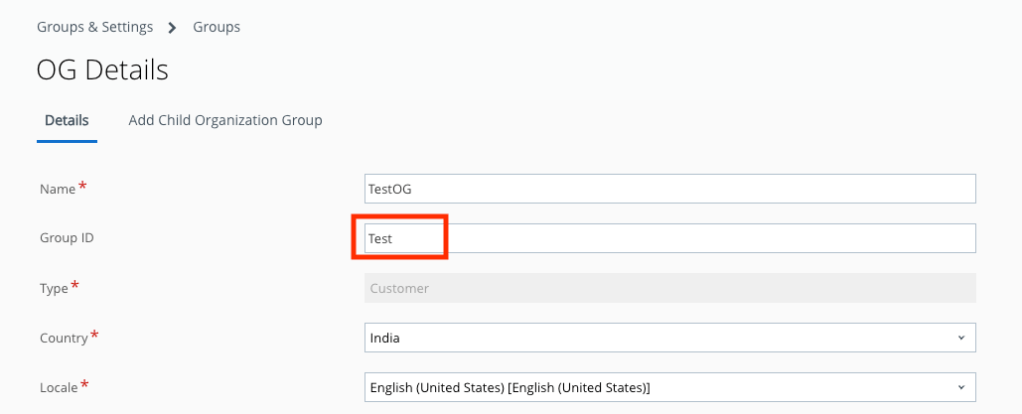
- In Omnissa UEM, go to:
- Groups & Settings → Groups → Organization Groups → OG Details
- Note the OG ID.
- In Omnissa Access, navigate to:
- Integrations → UEM → Workspace ONE UEM Configuration
- Check the Group ID listed.
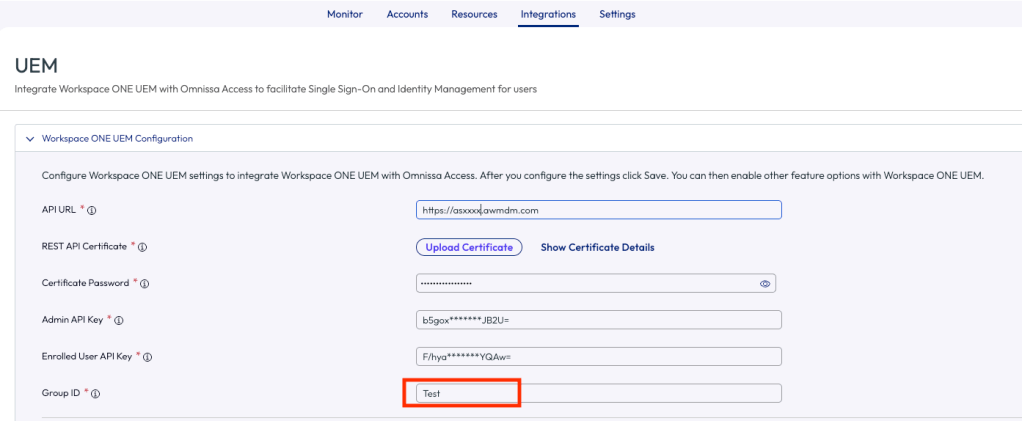
- If the integration between UEM and Access was performed automatically, the Group ID in Access might not match the one in UEM. Update the Group ID in Access to match the OG ID from UEM.
- This adjustment should resolve the issue on Windows. Note: the Hub catalog on iOS, macOS, and other platforms typically remains unaffected by an OG ID mismatch.
3. Conclusion
We frequently encounter this issue in new deployments. Updating the Group ID to match UEM should resolve it.
If the problem persists, it may stem from a misconfiguration within the Hub Configuration tab in Access.
Be sure to review the logs carefully. The Hub logs usually contain the necessary information to identify and fix the issue
 Navjyot Chaney's Blog